
Solving Boundary Value Problems with
MatLab
The goal of this exercise is to demonstrate how one can use MatLab to solve boundary
value problems. Our model problem for this will be
with boundary conditions T(0)=T(L)=0. We first finite difference the equation,
giving
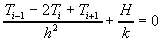
Then we move all the known quantities to the right side of the equation, giving
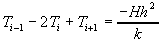
Now we can formulate a system of equations that can be solved. For
example, consider the following mesh:
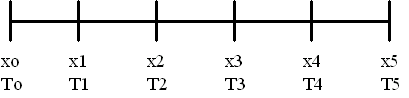
Note that we know all the x values and we know the boundary
temperatures, so our goal is to determine the temperatures at the internal mesh points.
Thus we have four unknowns (T1, T2, T3, and T4), and we need four equations.
These are obtained by writing the difference equations at each of the internal mesh
points.
The equations obtained by the process are:
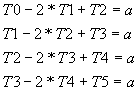
Since we know the boundary temperatures, we can write:
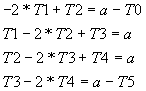
where

Now we would like to write this as a matrix equation:
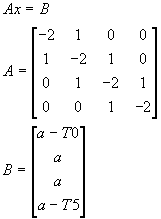
This equation is then easily solved using Matlab. Note that if we want to increase the
number of divisions, we just change h, increase the size of the A matrix,
and adjust B appropriately.